How do I use the AI Generate feature to create my post captions?
Creating engaging written content for your social media platforms is now easier than ever with SocialBu’s AI Content Generator. This powerful tool helps you generate captions, descriptions, and posts tailored to different platforms in just a few clicks.
Written By Farwa kazim
Last updated 2 months ago
Accessing the Generate Feature
After logging into your SocialBu account, navigate to the left-hand menu and click on Generate. This will open the AI Content Generator, where you can start creating captions and post content in just a few clicks.
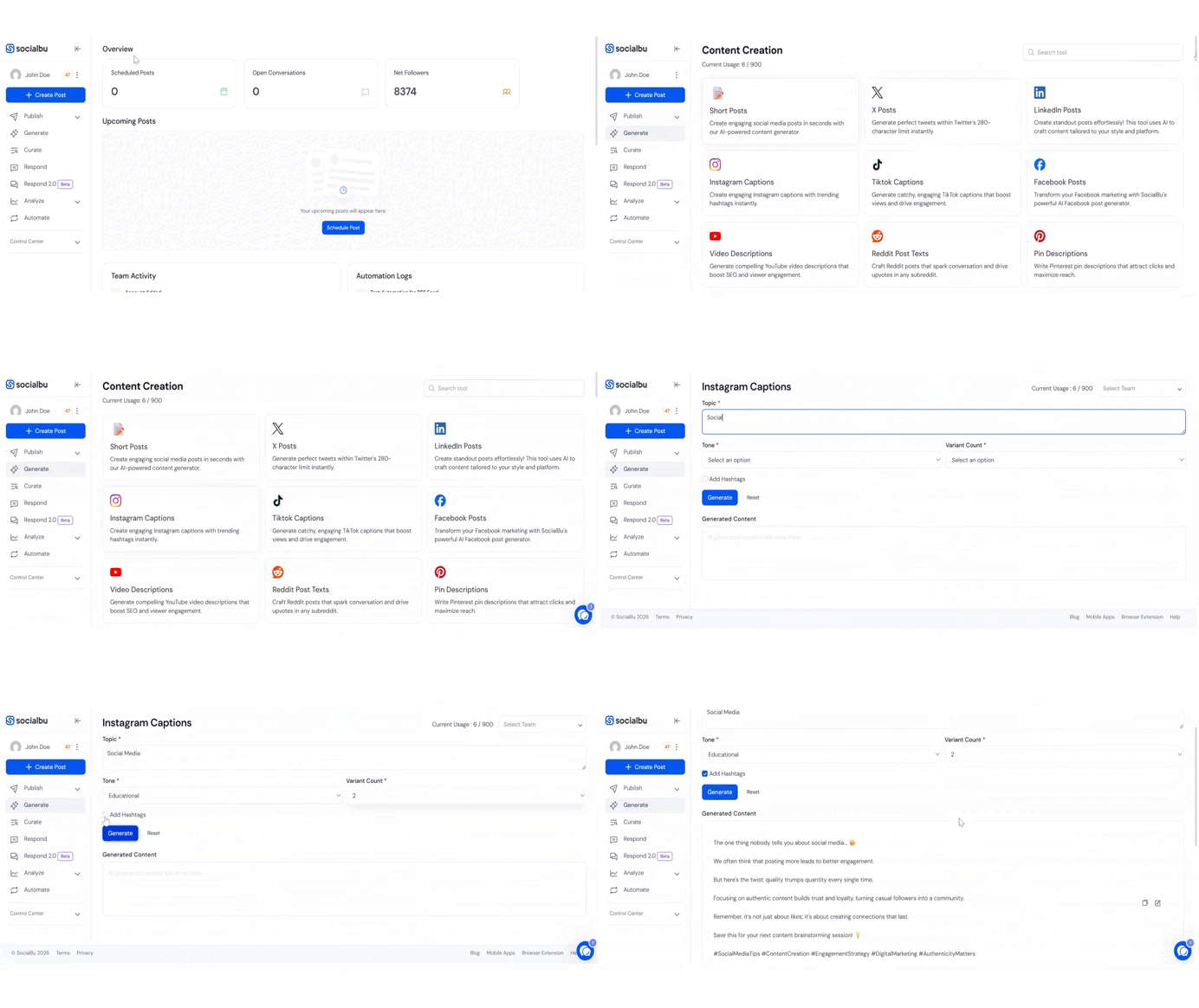
Selecting the Post Type and Platform
Begin by choosing the type of post you want to create. SocialBu supports multiple platforms, including LinkedIn, Twitter, and Instagram, among others.
Select the specific social media account you want the content for. The AI will tailor the tone, format, and character length according to the selected platform to ensure your post aligns with its audience and best practices.
Entering Your Topic
Next, enter a general topic, idea, or theme for your post. This can relate to your brand, a campaign, a product update, or a trending subject.
Based on your input, SocialBu may suggest related keywords or topic ideas to help refine the content. You can:
Select one of the suggested options, or
Continue with your original topic.
The more specific your input, the more targeted and relevant the generated content will be.
Reviewing and Creating Your Post
Once you submit your topic, the AI will generate content tailored to your selected platform.
Carefully review the generated text. If needed, you can adjust the tone or regenerate variations to explore alternative versions. When you’re satisfied with the result, click Create Post to proceed.
Posting or Scheduling
After creating your post, select the social media accounts where you want it to be published.
You can then choose to:
Post Now for immediate publishing, or
Schedule for Later to set a specific date and time.
This flexibility allows you to plan and manage your social media calendar efficiently while maintaining consistent engagement across platforms.
FAQs
Is the content unique?
Yes, all AI-generated content is plagiarism-free and tailored to your topic.
Can I customize the tone or length of the post?
Yes, you can customize and control the tone of the content, and all generated posts are automatically optimized to stay within the character limits of the selected platform.
Can I regenerate content if I don’t like the result?
Yes, you can generate content and choose from multiple variations for the same topic, allowing you to select the version that best fits your needs.
Is the “Generate” feature available on the Free Plan?
Yes, the Generate feature is available on the Free plan and includes 60 credit points that you can use to create content.
Does the caption include emojis and hashtags?
Yes, the AI automatically includes emojis and relevant hashtags.
Can I modify the generated post?
Yes, you can review and edit the AI-generated text before creating or scheduling the post.
If you have any other questions or feedback, feel free to email us at support@socialbu.com