How to cancel your SocialBu subscription
Learn how to cancel your SocialBu subscription, stop future renewals, and understand what happens after cancellation.
Written By Ghina Rehman
Last updated About 1 month ago
You can cancel your SocialBu subscription at any time from your account settings. To avoid being charged for the next billing cycle, cancel before your next renewal date.
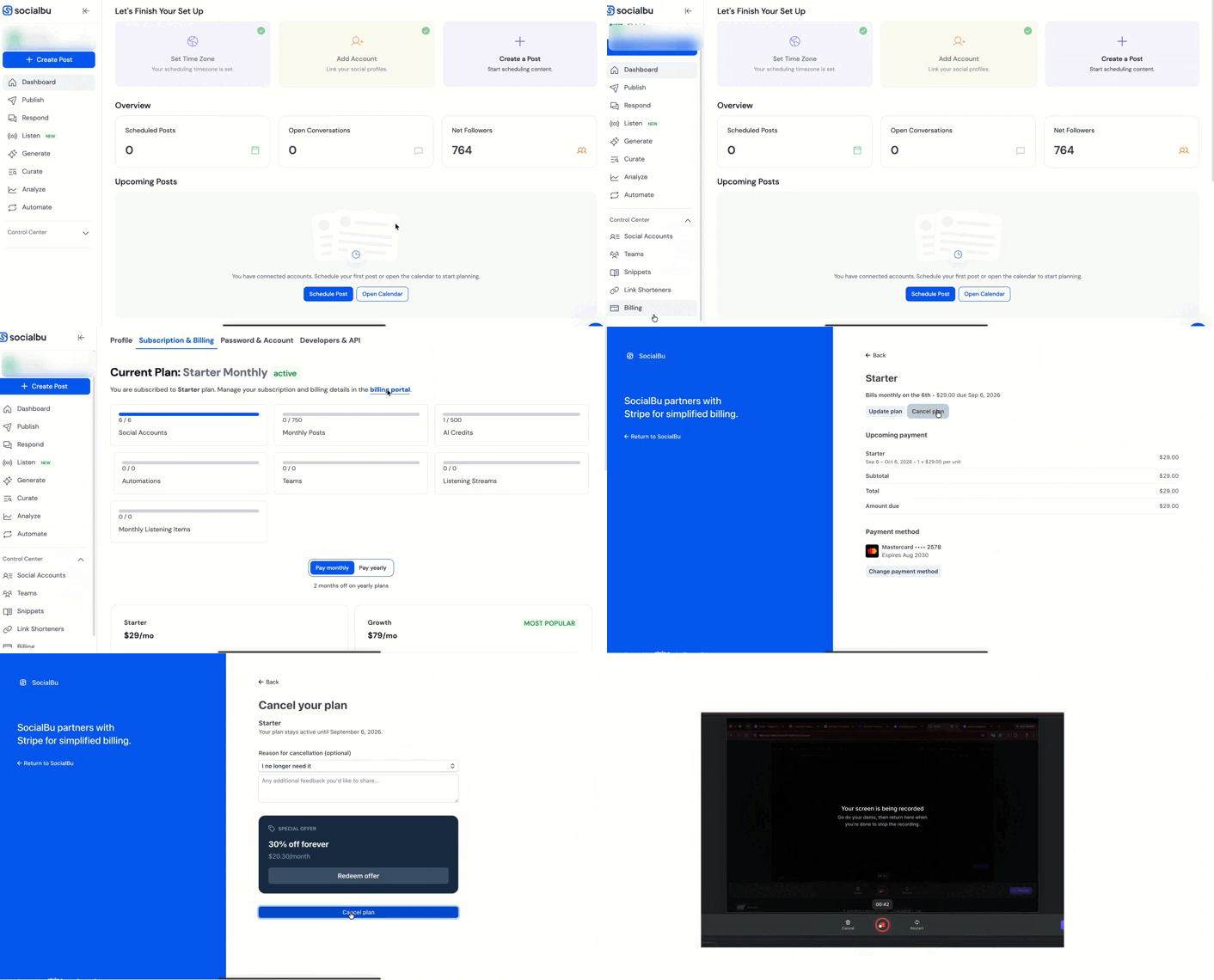
Step 1: Log in to your SocialBu account
Log in to your SocialBu account.
Click your profile icon or account menu.
From the dropdown menu, select Settings.
Step 2: Open Subscription & Billing
From the Settings menu, click Subscription & Billing.
Step 3: Manage or cancel your subscription
If you see a billing portal link or a Manage button, open it and follow the prompts there to cancel your subscription.
If your subscription is managed directly in SocialBu, scroll to your current plan and choose the available cancellation or downgrade option. In some accounts, this may mean selecting the Free plan.
If your subscription was started from the mobile app, manage cancellation through the app store account used for purchase.
Step 4: Confirm the cancellation
Follow the on-screen prompts to confirm your cancellation.
If feedback is requested, provide the details and continue until the cancellation process is complete.
If you are on a 7-day free trial, cancel before the trial ends to avoid being charged. If the trial is not canceled before it ends, the selected plan fee will be charged automatically in USD.
Important notes about cancellation
Canceling your subscription stops future renewals, but it does not automatically refund previous charges.
SocialBu does not collect or store your full card details. Payment information is handled securely by our payment provider, and after cancellation, your subscription will not renew for the next billing cycle.
Your paid features may remain available until the end of your current billing period.
If a renewal charge has already been processed, the cancellation will apply to the next billing cycle.
After the subscription ends or the account is downgraded, scheduled posts, automations, team access, analytics, and other premium features may be limited or unavailable.
If your subscription was purchased or managed through a third-party payment provider, you may need to cancel it from that platform as well.
If you have any issues or concerns, email us at support@socialbu.com.