Everything About the Analyze Feature in SocialBu
The Analyze feature in SocialBu helps you understand how your content, accounts, networks, and team are performing. It brings together publishing activity, audience growth, engagement, top posts, and platform-specific metrics so you can make better social media decisions.
Written By Ghina Rehman
Last updated 25 days ago
What is Analyze in SocialBu?
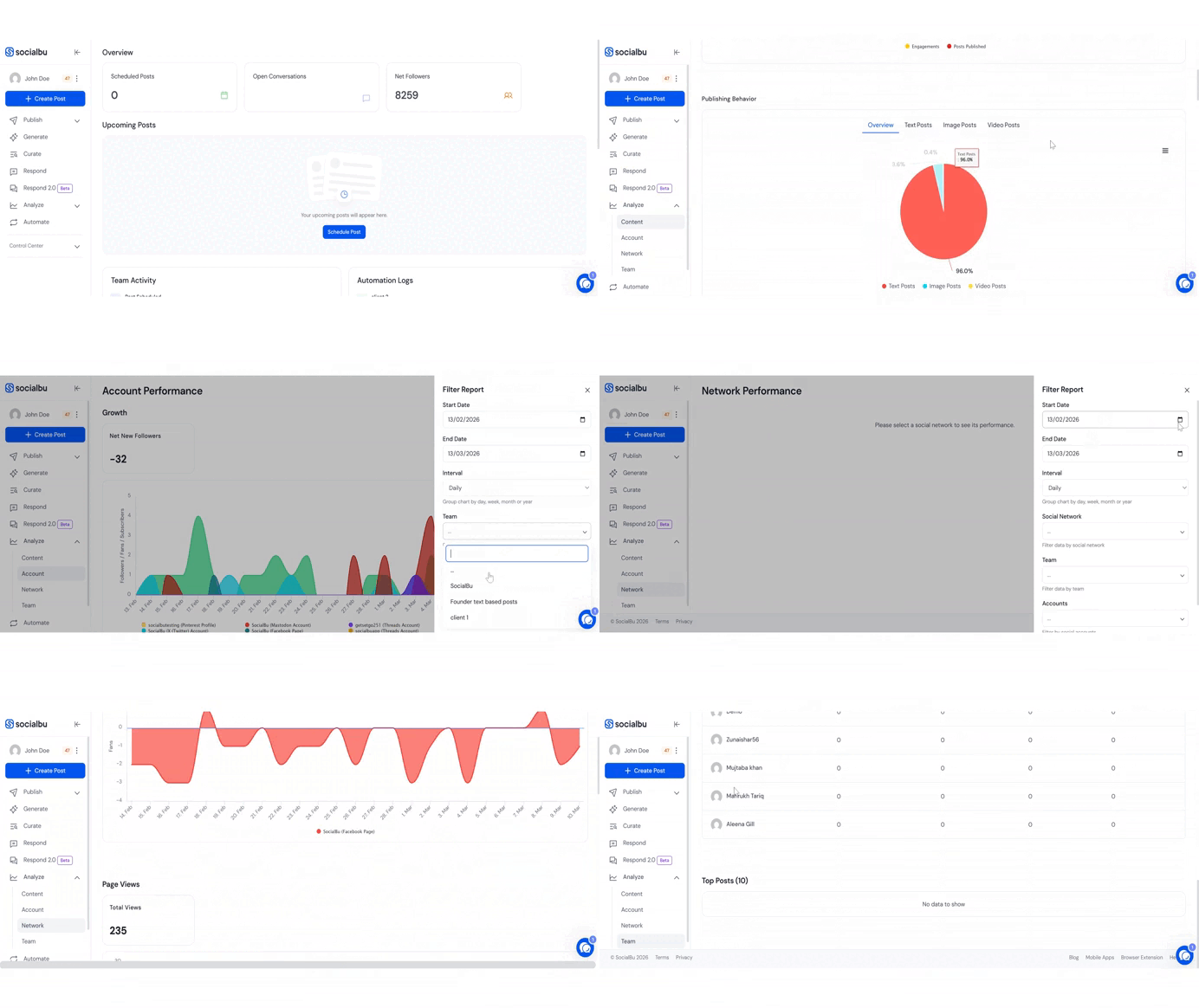
The Analyze section gives you a clear view of your social media performance across connected accounts. You can review high-level performance, content engagement, account growth, network-specific reports, and team activity from one place.
To open it, go to Analyze from your SocialBu dashboard, then choose the report tab you want to review.
Reports Available in Analyze
SocialBu currently includes these report tabs in the Analyze section:
1. Overview
The Overview report gives you a quick summary of what happened across your connected accounts, including overall performance, important activity, and top-performing content.
2. Content Performance
Content Performance helps you understand how your published posts are performing. It includes:
Posts vs Engagements
Publishing Behavior by post format, such as text, image, and video posts
Top Posts for the selected date range and filters
These insights help you see what type of content gets the most engagement from your audience.
3. Account Performance
Account Performance lets you compare connected accounts over time. It focuses on:
Growth, such as followers, fans, or subscribers where supported
Engagements received
Accounts Overview, including latest available account metrics
The exact metrics shown depend on the connected social network and the data available from that platform.
4. Network Performance
Network Performance shows platform-specific reports for supported networks. The current Network Performance report supports Instagram, Facebook Page, X/Twitter, LinkedIn organization or brand pages, Google Business Profile, and Pinterest.
Depending on the network, you may see metrics such as followers, impressions, reach, profile views, page views, actions, audience demographics, clicks, reviews, and other platform-specific insights.
5. Team Performance
Team Performance helps you review how team members contribute to publishing and engagement. It includes:
Total engagements
Scheduled posts
Published posts
Rejected posts
Top members
Top posts
This is useful for teams and agencies that manage social media with multiple contributors.
Note:
Hashtag engagement insights have been discontinued and are no longer available in Analyze.
SocialBu Metrics Guide by Platform and Post Type
SocialBu shows different metrics depending on the social network, account type, post type, and platform API availability.
Instagram Post Metrics
Facebook Page Post Metrics
LinkedIn Post Metrics
X/Twitter Post Metrics
Pinterest Post Metrics
Google Business Profile Metrics
Google Business Profile post metrics are not currently supported. For Google Business Profile locations, SocialBu can show account/location-level metrics such as desktop map views, mobile map views, website actions, phone actions, driving direction actions, and reviews.
Other Supported Metrics
Some SocialBu analytics endpoints also support metrics for YouTube, Threads, Bluesky, Mastodon, Reddit, TikTok account metrics, and other supported networks. Availability may vary by account type and platform API permissions.
Common Metrics Across Networks
The following metrics are commonly used in top posts and engagement reports where supported:
Likes
Comments
Shares
Reactions
Saves
Video views
Impressions or views
Total interactions
Filters and Date Range
You can filter Analyze reports by date range, team, connected accounts, network, and interval where available. The available filters may change depending on the report tab you are viewing.
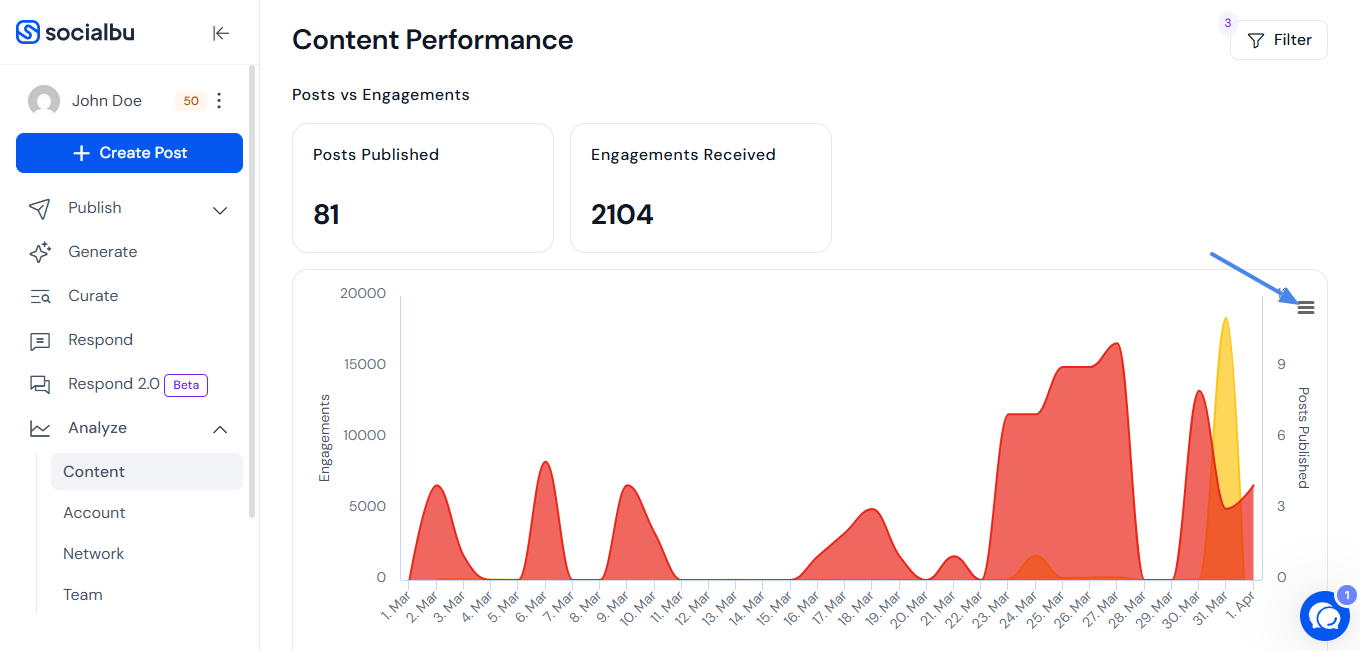
How to Download Graphs or Charts
Graphs and charts in Analyze can be downloaded from the chart menu. Available export options include PDF, PNG, and JPEG.
FAQs
Are reports available for all users?
Analyze is available based on your SocialBu plan, team access, connected accounts, and platform permissions. Some reports or advanced metrics may require the right plan or access level.
Can I download reports?
You can download supported graphs and charts as PDF, PNG, or JPEG from the chart menu.
How often is the data updated?
Analytics are updated regularly, but exact timing can vary depending on the social network, API availability, account permissions, and when SocialBu last fetched the data.
Why do some metrics not appear for my account?
Metric availability depends on the social network, account type, post type, permissions, and API limitations. If a platform does not provide a specific metric, SocialBu cannot display it.
Can I compare multiple accounts?
Yes. You can use filters to compare selected accounts, teams, or networks where supported.
Can I see team member contributions?
Yes. Team Performance shows publishing activity, engagement totals, top members, and top posts for the selected team.
Need Further Assistance?
If you have any other concerns or queries, email us at support@socialbu.com.