What Is Respond 2.0?
Learn what SocialBu Respond 2.0 is, where to find it, which platforms are supported, how to use it, and how to fix common inbox issues.
Written By Ghina Rehman
Last updated About 13 hours ago
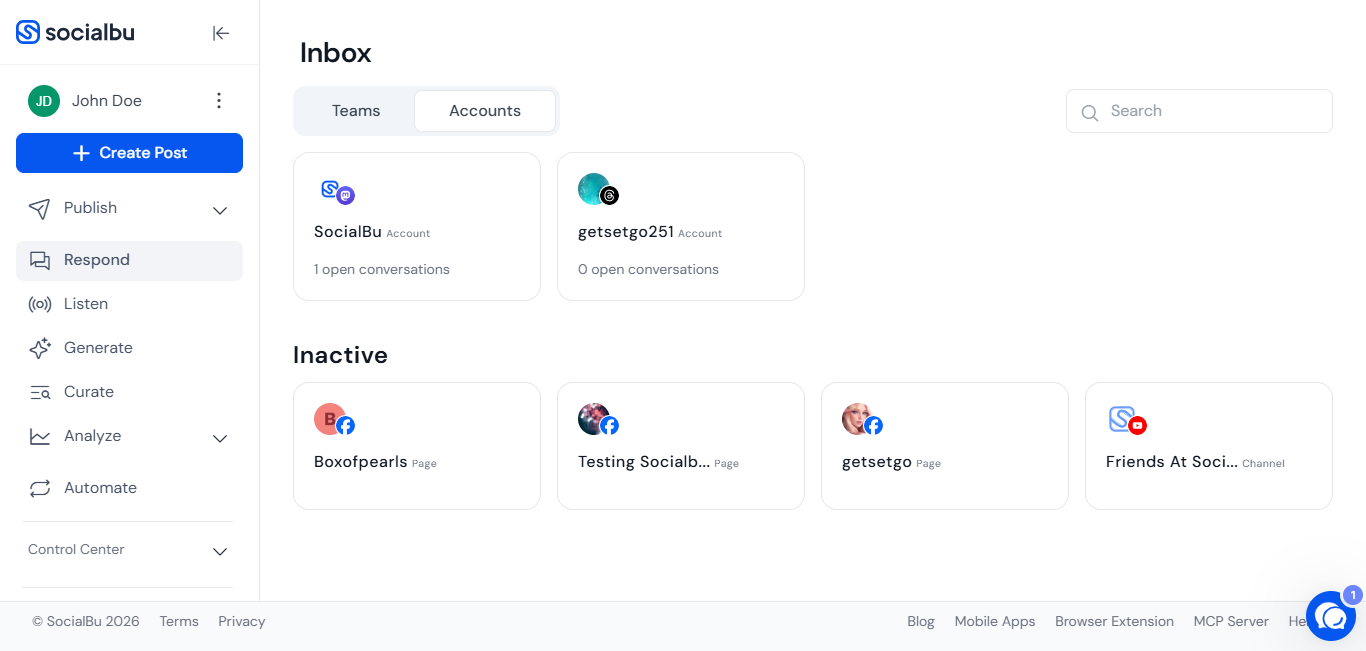
Respond 2.0 is SocialBu’s updated social inbox. It helps you manage comments, messages, replies, and conversations from your connected social accounts in one place, so you do not have to open each social network separately.
With Respond 2.0, teams can monitor conversations, reply faster, keep track of customer interactions, and manage engagement from a single screen inside SocialBu.
What Respond 2.0 helps you do
Respond 2.0 is designed to make social media engagement easier and more organized. You can use it to:
View conversations from connected social accounts in one inbox.
Reply to supported messages and comments.
Keep customer conversations easier to track.
Reduce the need to switch between social platforms.
Manage engagement as a team.
Review recent activity from supported connected accounts.
Handle support, community, and engagement workflows from SocialBu.
What does “all conversations in one place” mean?
Instead of opening every social network separately, Respond 2.0 brings supported conversations into one SocialBu inbox.
This means you can:
See incoming conversations from connected accounts.
Open a conversation and review the context.
Reply where the platform and account connection support replies.
Move through conversations faster.
Keep your team aligned on social engagement.
The exact actions available may vary by social network because each platform has different API permissions and limitations.
Where to find Respond 2.0
To open Respond 2.0:
Log in to your SocialBu account.
Go to the left-hand menu.
Click Respond 2.0.
You can also open it directly from: https://socialbu.com/app/respond-v2
Before you start
Before using Respond 2.0, make sure:
Your social accounts are connected to SocialBu.
The accounts have the permissions required for SocialBu to access conversations.
Your team role allows you to view and reply in Respond.
The selected platform is supported in Respond 2.0.
If a conversation or reply action is missing, the social account may need to be reconnected.
Which accounts work with Respond 2.0?
Respond 2.0 supports selected conversation types for Facebook Pages, Instagram API accounts, Google Business Profile locations, YouTube, LinkedIn organization pages, Threads, Mastodon, and Bluesky. Supported actions vary by platform, account type, permissions, and conversation type. Google Business Profile reviews can be viewed and replied to where the connected location has the required permissions.
TikTok and Pinterest are not supported in Respond 2.0 due to API limitations.
Some platform-specific notes:
Facebook and Instagram availability depends on the connected account type and permissions.
LinkedIn support is available for organization/page activity where supported. LinkedIn personal profile messages are not supported in Respond 2.0.
Some actions may not be available on every platform because social networks limit what third-party tools can read or reply to.
If an account is disconnected, expired, or missing permissions, its conversations may not appear until it is reconnected.
Twitter/X and Reddit are not generally available yet.
Is Respond 2.0 ready to use?
Yes, Respond 2.0 can be used for daily replies and engagement management.
Respond 2.0 is currently in Beta, which means the feature is actively being improved. Some behavior may change as we continue improving speed, coverage, filters, and platform support.
If something does not work as expected, contact SocialBu support so the team can review it.
Reading and replying to conversations
Inside an inbox, select a conversation from the list to open the full thread. Review the context before replying, especially if multiple team members manage the same inbox.
Where replies are supported, you can write and send your response from Respond 2.0. If the reply option is missing or disabled, the platform, account type, permissions, or conversation type may not support replies through third-party tools.
Conversation statuses
Respond 2.0 may use statuses to help teams organize conversation work. Common statuses include:
Open: conversations that need attention.
Pending: conversations waiting for more information or follow-up.
Closed: conversations that are handled.
Spam: conversations that should be separated from normal support or engagement work.
Use statuses consistently so team members know what still needs a reply and what has already been handled.
Notifications
Notification availability can depend on your workspace settings, inbox settings, and supported platform activity. If your team relies on fast replies, check the available notification settings in SocialBu and make sure the right team members are responsible for monitoring Respond 2.0.
If you are not receiving expected notifications, check account connection status, team permissions, and any email or workspace notification settings available in your account.
How to use Respond 2.0
Open Respond 2.0 from the left-hand menu.
Select the connected account, platform, or conversation you want to review.
Open a conversation to see the message or comment details.
Write your reply if replies are supported for that conversation type.
Send the reply from SocialBu.
Continue reviewing the remaining conversations.
If your team uses SocialBu together, make sure everyone understands who is responsible for replying so customers do not receive duplicate responses.
Tips for managing conversations
Check Respond 2.0 regularly if you use SocialBu for customer support or community engagement.
Reconnect accounts when permissions expire.
Keep replies clear, helpful, and brand-safe.
Review the original message carefully before replying.
Avoid sending duplicate replies if multiple team members manage the same inbox.
Use the native platform if you need an action that Respond 2.0 does not currently support.
Common questions and troubleshooting
I cannot see Respond 2.0 in the menu.
Check that you are logged in to the correct SocialBu workspace and that your role has access to Respond. If you still cannot see it, contact your workspace admin or SocialBu support.
My conversations are not showing.
Make sure the social account is connected and has the correct permissions. If the account was connected a long time ago, reconnect it from the Accounts section and then check Respond 2.0 again.
A specific account is missing from Respond 2.0.
The account may be disconnected, unsupported, or missing required permissions. Check the account connection status in SocialBu and reconnect it if needed.
I can see a conversation but cannot reply.
Reply availability depends on the platform, account type, permissions, and conversation type. Some platforms allow SocialBu to show activity but restrict third-party reply actions.
Why are TikTok and Pinterest not available?
Respond 2.0 currently does not support TikTok and Pinterest. Support for additional networks may be added as platform access and product support expand.
Are Twitter/X and Reddit supported?
Twitter/X and Reddit are not generally available yet. If you need to manage those conversations right now, use the native platform until support is available in SocialBu.
Does Respond 2.0 support LinkedIn personal profile messages?
No. Respond 2.0 does not currently support LinkedIn personal profile messages. LinkedIn support is focused on organization/page activity where supported.
Can I manage Instagram comments in Respond 2.0?
Instagram activity may be available depending on your connected Instagram account type and permissions. If Instagram conversations are missing, reconnect the account and confirm that the related Facebook Page and Instagram permissions are correct.
Why is there no Like button for Instagram comments?
Instagram comment liking is not currently available in Respond 2.0. You can reply to supported Instagram comments where available, but some actions may still need to be handled from the native platform.
Why do I see different conversations in SocialBu and the native platform?
Social platforms may limit what third-party tools can access. Differences can also happen because of account permissions, connection status, platform delays, or unsupported conversation types.
Why are new messages delayed?
Some conversations may take time to sync depending on the platform and account connection. Refresh Respond 2.0 and check again. If messages are still missing, reconnect the account or contact support.
Can multiple team members use Respond 2.0?
Yes, team members can use Respond 2.0 if their workspace permissions allow access. Teams should coordinate replies to avoid duplicate responses.
Is Respond 2.0 replacing the older Respond experience?
Respond 2.0 is the updated Respond experience and is being improved actively. It is intended to provide a better, more modern inbox experience inside SocialBu.
What should I do if Respond 2.0 is not loading?
Refresh the page, check your internet connection, try another browser, and disable browser extensions that may block scripts. If the issue continues, contact support with a screenshot.
Best practices
Reconnect accounts if conversations stop appearing.
Make sure the right team members have Respond permissions.
Use clear internal ownership for replies.
Review platform limitations before assuming an action is available.
Keep the native social platform available for actions not yet supported in Respond 2.0.
Report missing conversations or unexpected behavior with screenshots and account details.
Need further assistance?
If you have questions or Respond 2.0 is not working as expected, contact us at support@socialbu.com.
Please include:
Your SocialBu account email.
Workspace or team name.
Social account or platform affected.
A screenshot or screen recording.
The conversation type that is missing or not working.
Whether you recently reconnected the account.